



Starting a literature review doesn't always mean starting from zero. If you've been reading around your topic for weeks or months, you likely already have a collection of papers worth building from.
This guide explains how to take what you already have, get it into a system that works, find what's missing, and turn a pile of PDFs into a structured literature review.
Why your existing papers are a head start
Most literature review guides assume you're beginning from scratch. But if you already have papers, you're ahead. You have a sense of the field, you know which papers feel important, and you have a foundation to build on.
The challenge at this stage isn't finding more papers. It's three things:
- Getting organized so you can see what you have clearly
- Identifying what's missing from your collection
- Turning a set of sources into a structured argument
All three are solvable. Here's how.
Step 1: Get everything into ResearchRabbit
Before you can build on the papers you already have, you need to bring them into ResearchRabbit. The best way to do that depends on where your papers are currently stored.
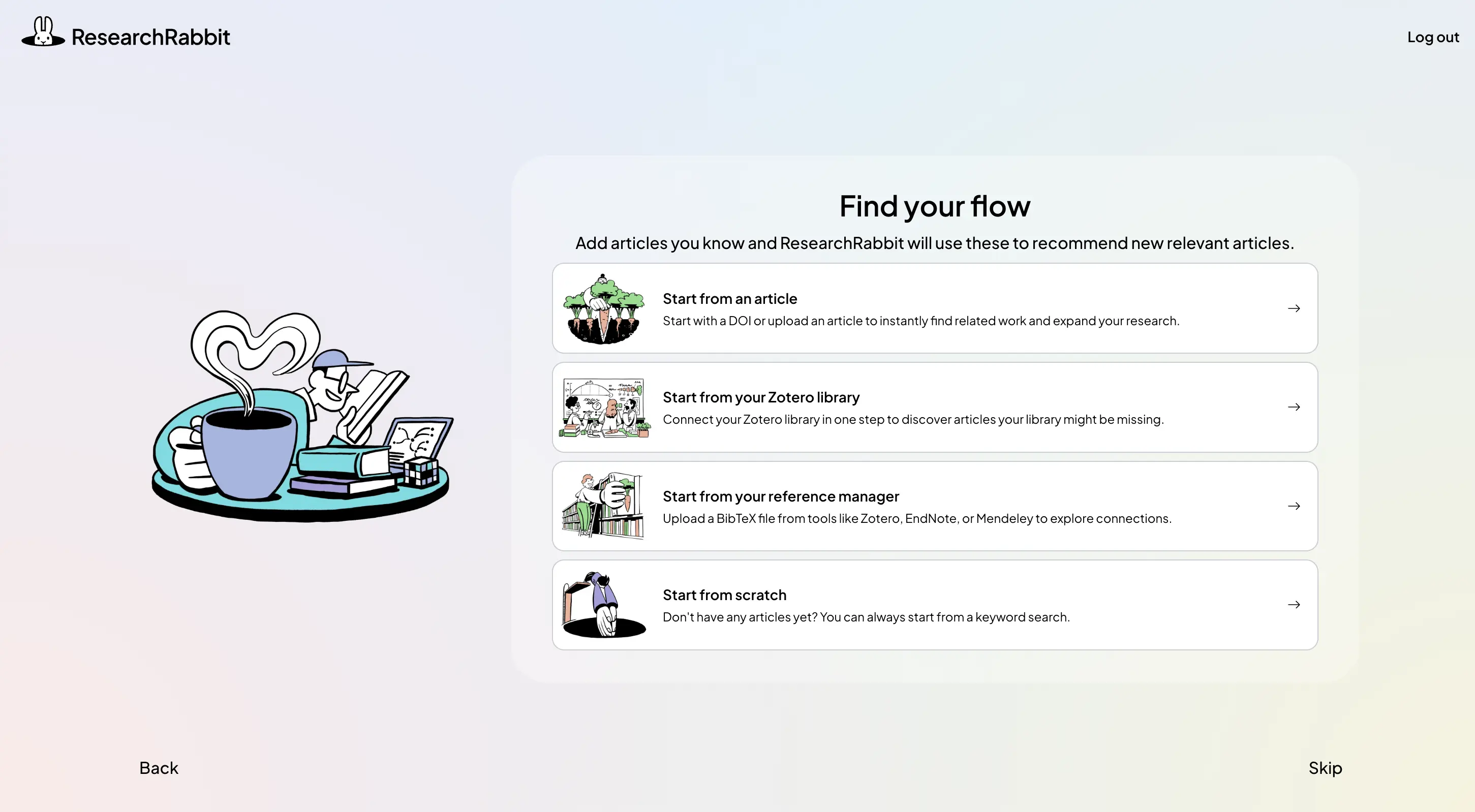
- If you have PDFs: During onboarding, choose Start from an article and upload a PDF. ResearchRabbit will extract the article details automatically so you can use it as a starting paper. PDF upload is currently only available on the onboarding screen. If you've already completed onboarding, search for the paper by title or DOI instead.
- If you have a DOI or know the paper: Choose Start from an article and paste the DOI into the search box. Review the article details to make sure ResearchRabbit has found the right paper, then use it as your starting point. If you've already completed onboarding, you can search by DOI or title directly from the main search bar.
- If you have a Zotero library: Choose Start from your Zotero library on the Find your flow screen. Authenticate your Zotero account, select the collections you want to bring across, and click Import Collections from Zotero. Once your library has loaded, you can select individual papers or a whole collection to start exploring. Already using ResearchRabbit? You can import more Zotero collections later from your Library page.
- If you use another reference manager: Choose Start from your reference manager. Export your papers from tools such as Mendeley, EndNote, or Paperpile as a BibTeX (.bib) file, then upload it to ResearchRabbit. You can review the articles, select the ones you want, and create a collection from them.
- If you have a mix: Use whichever route matches each part of your existing library — Zotero for Zotero collections, BibTeX for another reference manager, and title or DOI search for individual papers. You don't need to start over or rebuild your library manually. The goal is to bring your useful existing papers into ResearchRabbit so you can start exploring from work you already know.
Step 2: Read the map before you read the papers
Once your papers are in a ResearchRabbit collection, the citation map builds around them automatically. Before opening any individual paper, spend a few minutes reading the map itself.
Papers are positioned by publication date on the x-axis and citation count on the y-axis. This positioning tells you something immediately useful:
.webp)
- Papers in the upper left are older and highly cited, likely foundational work
- Papers in the upper right are recent and highly cited, currently influential
- Papers in the lower right are recent with fewer citations, emerging work worth watching
- Papers that appear isolated from the main cluster may be peripheral, or may signal a whole branch of the literature you haven't reached yet
Citation count can help you spot influential papers, but it isn't a measure of quality or relevance. Evaluate each paper against your research question before deciding whether to include it. For a practical framework for doing that quickly, see how to evaluate a research paper quickly.
Spend time with the map before doing anything else. The structure often gives you an early sense of the themes, clusters, and gaps in your literature, before you've written a word of it. For a full walkthrough of how to navigate the citation map, see how to build a citation map with ResearchRabbit.
Step 3: Find what's missing
This is the most valuable thing ResearchRabbit can do with papers you already have: show you what you're missing.
.webp)
Select References from any paper in your collection to see what it was built on. If a paper appears in the reference lists of multiple papers you've already collected and you don't have it yet, that's worth noting, it may be foundational work your review needs, though relevance to your specific research question still determines whether to include it.
Select Citations to see what has cited your papers since they were published. Papers published after your most recent sources might be updating or challenging findings you're planning to cite. Checking forward citations is one of the fastest ways to verify that your existing papers are still current.
Select Similar to find papers that are frequently co-cited alongside your seeds. These are papers the field treats as intellectually related, even if they use different terminology or come from adjacent disciplines. This is often where the most surprising gaps appear.
Add relevant papers as you find them. Each paper you add becomes a new seed, expanding the network and surfacing further connections. For a deeper explanation of how each direction works, see how to find papers with citation networks.
Step 4: Organize papers for your literature review by theme
Once you have a reasonably complete collection, move from a list of papers to a set of themes. Themes are what your literature review will be structured around.
A synthesis matrix can help you compare papers systematically. In a simple spreadsheet, each row represents a paper and columns capture things like methodology, key findings, theoretical framework, and relevance to your research question.
Before building one, use your ResearchRabbit citation map to look for patterns in your collection. Groups of closely connected papers can point you toward possible themes or
research conversations worth investigating. These connections don't tell you what the papers say, so use them as a starting point rather than as your final thematic structure.
As you read the papers in each cluster, record what you learn in your synthesis matrix. You can then refine your themes based on both the citation relationships between papers and the actual arguments, methods, and findings in them.
In ResearchRabbit, create subcollections for each theme you identify. A paper can belong to more than one theme, copy it rather than move it when themes overlap.
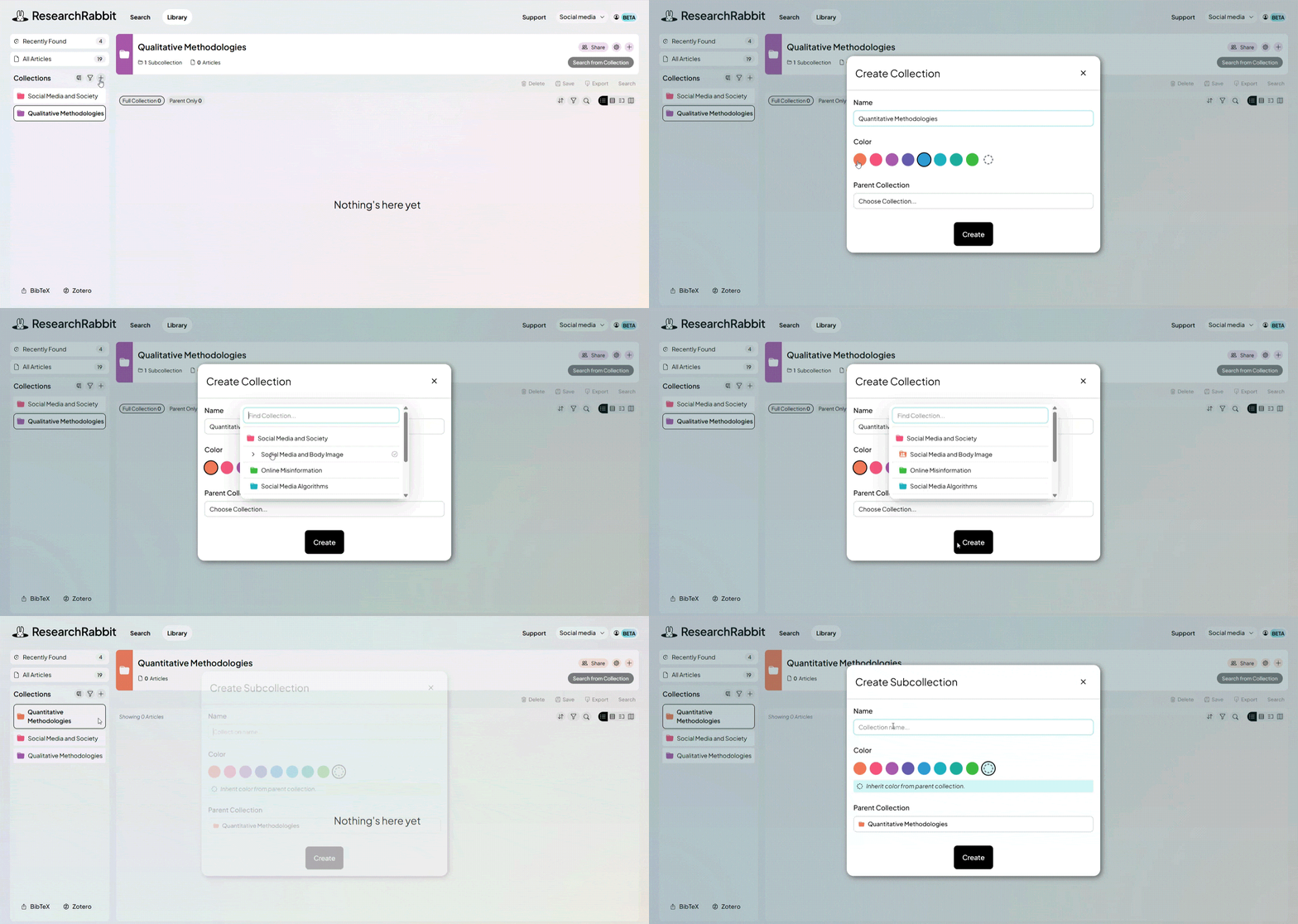
Common ways to organize themes:
- By the question each paper addresses
- By the methodology each paper uses
- By the population or context each paper studies
- By the theoretical framework each paper applies
You'll refine your themes as you go. Start with rough categories and tighten them as your understanding of the field develops. For a full system for organizing papers across a long project, see how to organize research papers without losing track.
Step 5: Add notes as you review
For each paper, add a note in ResearchRabbit capturing one evaluative sentence: what this paper contributes to your specific research question, and how it relates to other papers you've read.
.webp)
This is different from summarizing. You're not writing down what the paper found, you're writing down what it means for your argument.
Useful note formats:
- "This paper establishes X, which supports my argument about Y."
- "This challenges the finding in [other paper] by showing Z."
- "Methodologically relevant: same population as my study, different outcome measure."
- "Background context only, don't cite as primary evidence."
Notes attached to papers in ResearchRabbit stay visible when you return to them weeks later. You won't need to reread the abstract to remember why you included each paper.
Step 6: Identify research gaps in the literature, not just your collection
There's an important distinction between gaps in your collection (papers you haven't found yet) and gaps in the literature (questions the field hasn't answered). Your literature review should address both.
Gaps in your collection are addressed by the citation network search above. Gaps in the literature are identified by looking across your organized themes and asking:
- Where do papers consistently point to future research?
- Where do findings contradict each other without resolution?
- Where is an important population, context, or methodology missing from the conversation?
- Where has the field built on older work without questioning its assumptions?
These gaps are what your literature review, and your research, exists to address. Identifying them before you start writing makes the review significantly easier to structure.
Step 7: Start writing your literature review from themes, not your reading list
With papers organized by theme and notes capturing each paper's contribution, you're ready to write.
Each theme becomes a section of your literature review. Each section opens with a claim about what the literature shows in that area, not a citation, but a sentence you're willing to defend. The papers in that theme become the evidence for the claim.
This is synthesis rather than summary. Instead of "Jones (2015) found X. Smith (2018) found Y," you're writing "Research consistently shows X, though findings diverge on the question of Y (Jones, 2015; Smith, 2018; Brown, 2020)."
The organization you built in Step 4 becomes your outline. The notes from Step 5 become your evidence. The gaps from Step 6 become your conclusion, the opening for your own research. For a full guide to structuring and writing the review itself, see how to do a literature review.
FAQ
I have hundreds of papers. Where do I start? When you have a large existing collection, start with five to ten papers you've already read and trust rather than importing everything at once. Add those to ResearchRabbit as seeds and let the citation map show you which papers are central to the network. Central papers -- those with many connections to others -- can be useful starting points for understanding the core research conversation. Prioritize them based on their relevance to your research question. You can add more papers iteratively as your picture of the field develops.
Should I add all my papers to ResearchRabbit at once? You don't need to add every paper to ResearchRabbit at once. Start with five to ten papers that are highly relevant to your research question and let the citation map show you which papers connect to them. Each paper you add becomes a new seed and expands the network, so you'll naturally reach the important papers without needing to import everything upfront. Adding too many papers at once can produce a network too large to navigate usefully.
How many papers do I need for a literature review? There's no universal number. What matters is whether you've covered the key debates, foundational work, and recent developments relevant to your research question -- not hitting a specific count. A smaller set of highly relevant, carefully selected papers can be more useful than a much larger collection of loosely related ones. The citation network in ResearchRabbit helps you check coverage: when
new searches consistently surface papers you've already found, you've likely mapped the core of your literature.
My papers are from different disciplines. How do I organize them? Cross-disciplinary collections work well with ResearchRabbit's Similar search, which finds connections between papers that use different vocabulary -- exactly what happens when the same concept appears in multiple fields under different names. Organize by theme or research question rather than by discipline, and let the citation connections show you where the fields overlap.
How do I check whether my papers are still current? Select Citations in ResearchRabbit for any paper you want to check. This shows everything that has cited it since publication, including papers that update or challenge its findings. If recent work is consistently building away from a paper's conclusions, that's worth noting when you cite it. This is especially useful for papers published more than five years ago in fast-moving fields.
When should I stop adding papers and start writing? A reliable signal that you've mapped the core of your literature is when new citation network searches consistently surface papers you've already found. At that point, the network has largely closed. The goal isn't exhaustive coverage of everything ever published -- it's confident familiarity with the work most relevant to your research question.
Start with the papers you already have
You don't need to find every paper before you begin. The papers you already have are enough to start mapping your field, identifying what's missing, and building a structure for your review.
The workflow in short: get your papers into ResearchRabbit, read the citation map, use References, Citations, and Similar to find what's missing, organize by theme and, if useful, build a synthesis matrix to compare methods and findings, take evaluative notes, identify the gaps your research addresses, and write from those themes.
Each step builds on the last. And the papers you already have are the right place to start.
Start building your literature review in ResearchRabbit →
%20(800%20x%201036%20px).webp)






This is a big test comment on your article.