


Every researcher knows the feeling. You saved a paper three weeks ago that said exactly what you need right now. You know you have it. You just can't find it.
Maybe it's in your downloads folder under a filename like "1-s2.0-S0147596723000514-main.pdf." Maybe it's in one of six browser bookmark folders. Maybe it's in a Zotero library that hasn't been properly organized since you created it. Or maybe you genuinely can't remember whether you saved it at all.
If you're trying to figure out how to organize research papers for a literature review or long-term research project, the solution isn't a more complicated folder system. You need a workflow that helps you store, connect, annotate, and retrieve papers as your research develops.
Disorganized research isn't just frustrating. It costs real time: re-finding papers you've already found, rereading abstracts you've already assessed, and losing notes you've already written. This guide shows you how to build a research paper organization system that actually holds together across a long project.
A simple research paper organization system
Before the detailed steps, here's the framework in full:
The rest of this guide explains how to build each stage.
Why most organization systems break down
The most common advice for organizing research papers is file naming conventions, something like "AuthorYear_Topic.pdf." And file naming does help, a little. But it doesn't solve the actual problem.
The actual problem is that research papers don't exist in isolation. They relate to each other. A paper means something different depending on which other papers you read it alongside, which thread of argument you're developing, and what question you're trying to answer. A filename tells you who wrote a paper and when. It tells you nothing about why you saved it, what it contributes to your review, or how it connects to the other papers in your collection.
An organizational system that treats papers as files to be sorted misses what matters. A system that treats papers as nodes in a network of ideas, with connections, context, and notes, is the one that actually holds.
The three things that make a system work
A research organization system needs to do three things:
1. Let you find any paper quickly, regardless of when you saved it or what you named the file.
2. Let you see how papers relate to each other, so you can identify themes, spot gaps, and understand the shape of your literature before you start writing.
3. Capture your thinking as you go, so your notes are still useful three months later when you're in the middle of writing.
Most systems do the first passably. Almost none do the second or third well. Here's how to build one that does all three.
Step 1: Choose one place for everything
The most important rule of research organization is the simplest: everything goes in one place. Not some papers in Zotero, some in a folder on your desktop, some bookmarked in Chrome, and some in a reading list on your phone. One place.
A reference manager is the right tool for this. The most common options are:
- Zotero
Free, open-source, browser connector for one-click saving, integrates directly with ResearchRabbit. The recommended choice if you're starting fresh or want the tightest workflow with citation network tools. - Mendeley
Free tier available, owned by Elsevier, strong PDF annotation features. Works well if your institution already uses it. - EndNote
Common in health sciences and often provided by institutions. More complex, but powerful for large collections.
Whichever you choose, the principles below apply equally. The Zotero + ResearchRabbit workflow is described in detail because the integration is the most direct, but the organizational approach works with any reference manager.
When you save a paper, verify the metadata: author, year, title, journal. Reference managers usually capture this correctly from databases, but errors happen, and a wrong year or author name causes problems later when you're generating references.
Practical rule: If a paper isn't in your reference manager within 24 hours of finding it, it doesn't count as saved. Browser tabs close. Downloads folders get cleaned. Your reference manager doesn't disappear.
Step 2: Connect your reference manager to ResearchRabbit
If you're using Zotero, you can import your papers directly into ResearchRabbit using the Zotero Importer. Here's how it works:

- In ResearchRabbit, click your profile in the top-right and go to Account Settings
- Choose the Preferences tab
- Under Zotero Libraries, click Link Zotero and complete the one-time authentication
- Once linked, go to the Library page and click the Zotero button in the bottom-left
- Choose which Zotero collection to import and select which papers to bring in
Papers imported from Zotero become part of your ResearchRabbit library. Note that this is currently a one-way import, ResearchRabbit is working on a two-way sync feature, but for now, papers you find in ResearchRabbit can be exported back to Zotero via BibTeX.
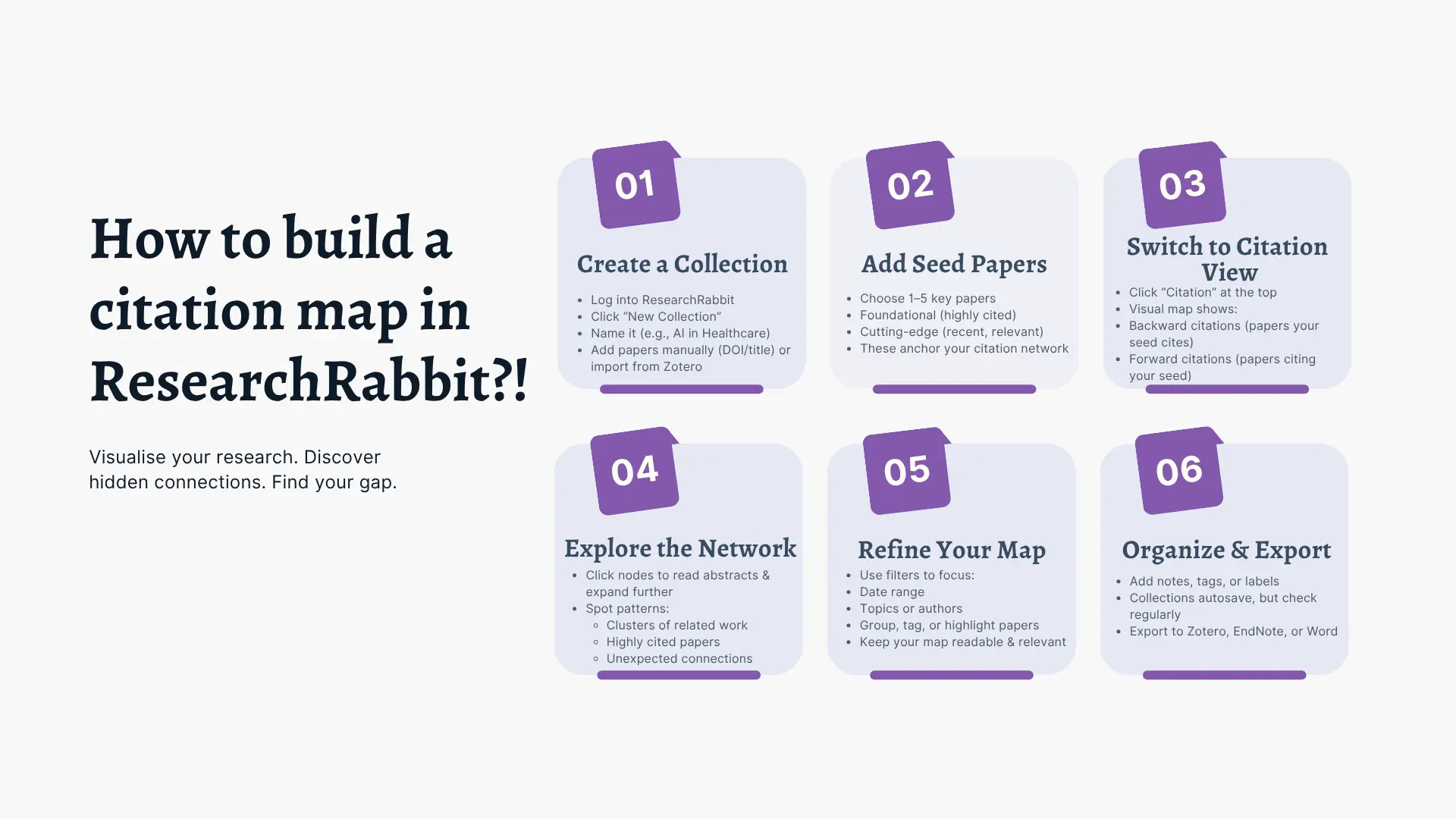
This import does something no folder system can: it builds a citation map from papers you already have. Your imported papers become seeds, and the network that forms around them shows you which papers are closely connected, which are peripheral, and which parts of the literature you might not have reached yet.
Think of your reference manager as your permanent archive, where every paper lives and where your formatted references come from. Think of ResearchRabbit as your research workspace, where you explore connections, organize by theme, and take notes.
Think of your reference manager as your permanent archive, where every paper lives and where your formatted references come from. Think of ResearchRabbit as your research workspace, where you explore connections, organize by theme, and take notes. Instead of organizing papers only by where you saved them, ResearchRabbit helps you see how they connect within the wider literature, making it easier to identify themes, related work, and gaps as your research develops.
Step 3: Organize by theme, not by author or source
A common way to organize papers is by source, "papers from Google Scholar," "papers from Scopus," "papers from supervisor recommendations." This tends to be less useful for literature review purposes than it seems: where a paper came from has little to do with what it contributes to your argument.
Organizing by author or date (a flat alphabetical or chronological list) is easier to navigate, but still doesn't tell you how papers relate to your research question.
Organizing by theme is generally more useful when you're preparing to write. A theme is a research question, debate, methodological approach, or conceptual category that a group of papers addresses together. In ResearchRabbit, create a collection for each theme you identify. Papers that address multiple themes can live in multiple collections, copy rather than move when there's genuine overlap.
How to identify themes before you're sure what they are:
- Look at the citation map in ResearchRabbit. Papers that cluster together are usually addressing similar questions or using similar methods.
- Look at the keywords in your papers. Recurring terms often signal recurring themes.
- Look at what your papers' conclusions point to. If several papers call for future research on the same question, that question is probably a theme, and possibly a gap.
You'll refine your themes as you read more. That's normal. Start with rough categories and tighten them as your understanding of the field develops.
Step 4: Take notes that survive the months
The biggest organizational failure in most literature reviews isn't losing papers, it's losing thinking. You read a paper, you understand exactly what it means for your argument, and you move on. Three months later, you can't remember why you saved it.
The solution is simple and easy to skip: write one evaluative sentence for every paper you read, immediately after you read it.
Not a summary. Not a list of findings. One sentence about what this paper contributes to your specific research question, and how it relates to other papers you've read.
Examples:
- "This paper establishes the link between X and Y, which is the theoretical foundation for my argument in Chapter 2."
- "This challenges the finding in Jones (2015), will need to address the contradiction directly."
- "Methodologically relevant: same population as my study, but different outcome measure."
- "Background context only, don't cite as primary evidence."
In ResearchRabbit, add this note directly to the paper in your collection. When you return to it three months later, the note is there, attached to the paper, visible alongside the abstract. You won't need to reread the paper to remember why you included it.
Step 5: Track your reading status
A system that doesn't tell you what you've read is only half a system. As your collection grows, you need to know at a glance which papers you've read, which you've skimmed, and which you've saved but haven't opened yet.
Not every paper needs the same level of attention. A simple system for deciding how deeply to read each research paper can help you prioritize your time before tracking its status.
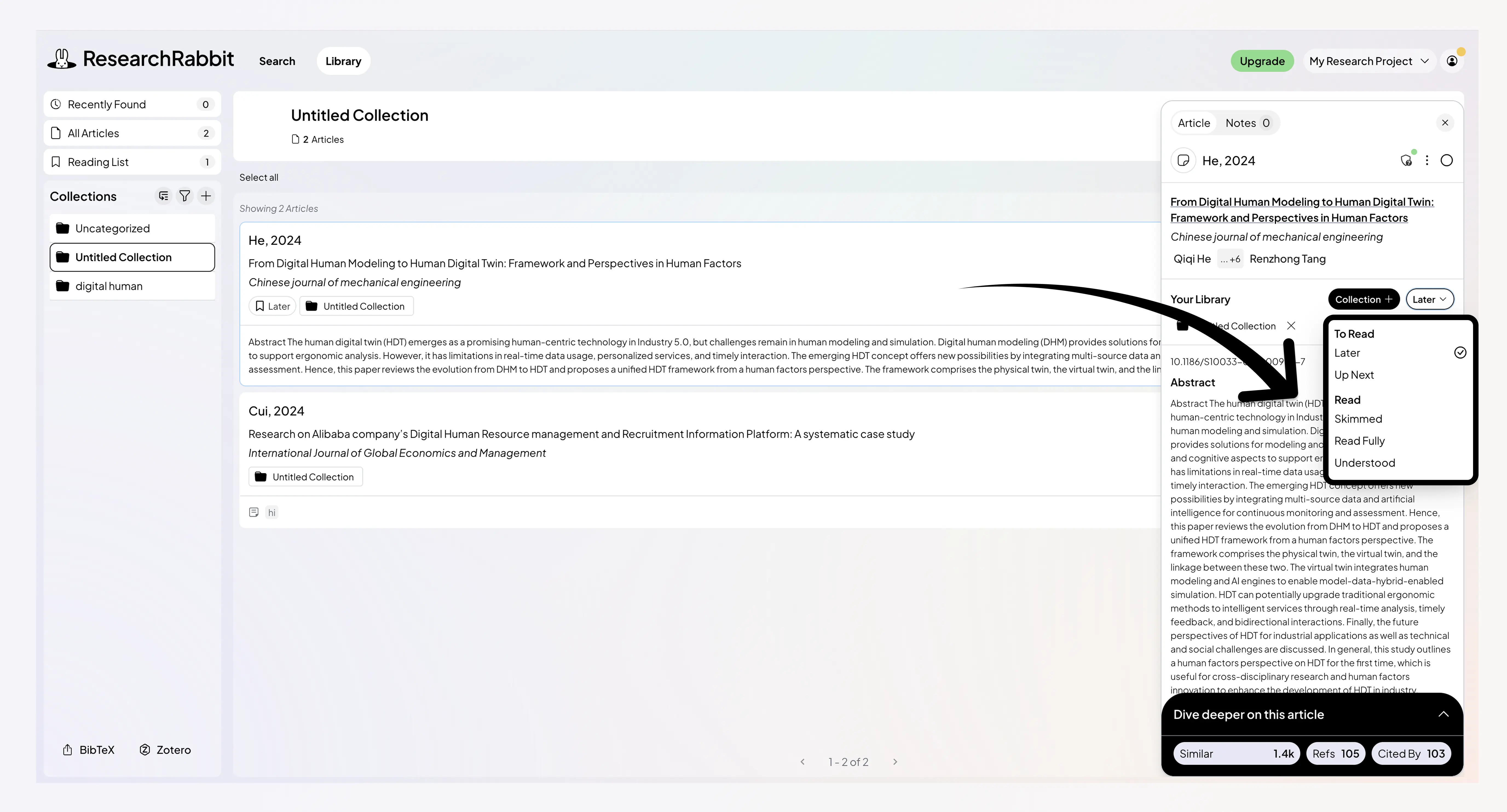
A simple Three-status system works for most projects:
- To read
Saved, Up next - Skimmed
Read abstract and conclusion, assessed relevance - Read fully
Full read, notes added
In ResearchRabbit, you can use subcollections to track status, create a subcollection called "to read" within each theme collection, and move papers to the main collection once they've been properly read and noted. Some researchers also create a dedicated "priority reads" collection for papers that are clearly central and need a full read soon, a useful way to separate the essential from the merely relevant when your collection is large.
Some researchers prefer a simple note or color tag in their reference manager for the same purpose.
The method matters less than the consistency. Whatever system you use, apply it to every paper from the start. A partially tracked reading list is almost as useless as no tracking at all.
Step 6: Build iteratively, not all at once
The worst time to organize your research papers is after you've collected all of them. By then, you have hundreds of PDFs, dozens of browser bookmarks, a Zotero library that's overflowing, and no memory of which papers are actually important.
“The best time to organize is continuously, as you go, paper by paper, from the start of your project. This kind of iterative approach is also at the heart of a modern literature review workflow.
In practice: every time you save a paper, verify its metadata in Zotero, add it to the relevant theme collection in ResearchRabbit, and write your one-sentence note when you read it. This takes about three minutes per paper. Across a literature review of eighty papers, that's four hours of consistent effort spread over weeks or months, rather than a desperate reorganization crisis the night before you need to start writing.
As you add papers, let the ResearchRabbit citation map evolve. Papers you add become new seeds, expanding the network and often surfacing connections, and gaps, you hadn't seen before. The organization and the discovery happen at the same time.
Step 7: Know when to export and move on
At some point, your collection is organized, your notes are in place, and you're ready to write. Here's how to transition cleanly from organization to writing:
Export from your reference manager into your writing tool. Zotero, Mendeley, and EndNote all integrate with Word, Google Docs, and most other word processors. Your reference list generates automatically as you write and cite.
Keep ResearchRabbit open alongside your draft. When you're writing about a specific theme, your ResearchRabbit collection for that theme is your reference. Your notes tell you what each paper contributes. The citation map shows you how the papers in that section relate to each other, useful for checking whether your synthesis reflects the actual structure of the literature.
Don't reorganize while writing. The temptation to keep improving your organizational system while you're supposed to be drafting is real and counterproductive. If you notice a paper is miscategorized, add a quick note and move on. Fix the organization after you've finished the draft.
Already have papers saved? Import your Zotero collection into ResearchRabbit and start exploring how they connect.
Common mistakes and how to avoid them
Saving papers without reading them first. A collection of unread papers is not a literature review, it's a to-do list. Save papers when you find them, but only move them into your active collections once you've at least skimmed them for relevance.
Creating too many theme categories too early. If you're early in your collection and your themes keep shifting, that's a sign to stay broader for now. Start with rough categories and split them as your collection and understanding of the field grow.
Using different systems for different projects. Every new project that gets its own folder structure, its own naming convention, and its own separate library creates a new system you have to maintain. Keep one reference manager library for everything, organized by project at the collection level, and connect it to ResearchRabbit for each project's workspace.
Not backing up. Most reference managers sync to the cloud automatically, make sure this is enabled. Losing a literature review collection is a genuinely catastrophic event that a two-second setup step prevents.
FAQ
What's the best reference manager for organizing research papers? The most common choices are Zotero (free, open-source, direct ResearchRabbit integration), Mendeley (free tier, strong PDF annotation), and EndNote (common in health sciences, often institution-provided). Zotero is the recommended starting point if you don't already have a preference, its ResearchRabbit integration is the most direct, and it's free. But the organizational principles in this article apply equally to any reference manager.
How many folders or collections should I have? As many as you have distinct themes, and no more. A collection per project, with subcollections for each theme within the project. If you find yourself creating collections you never look at, consolidate. If you can't find papers because your collections are too broad, split them.
Should I save every paper I find, or only the ones I know I'll use? Save papers when you find them and think they might be relevant, it's easier to remove something later than to find it again. But don't let "saving" substitute for assessing. A paper in your collection with no note attached is a paper you haven't really processed yet.
How do I handle papers that fit multiple themes? Copy them into both theme collections. In ResearchRabbit, a paper can exist in multiple collections simultaneously. The citation map will show its connections regardless of which collection you're viewing from.
When should I reorganize my collection? Reorganize when the structure stops reflecting your understanding of the field, usually when you've read enough to see that two themes are actually one, or one theme has split into three. Don't reorganize out of anxiety. Reorganize when the current structure is actively making it harder to find what you need.
%20(800%20x%201036%20px).webp)



This is a big test comment on your article.